Nmap XML into
a clean report,
instantly

Transform raw Nmap XML into a single interactive HTML report. Sortable, filterable, exportable. One command, no backend.
NmapView is an Nmap XML report viewer that converts Nmap scan results into a portable interactive HTML report. Analyse hosts, services, certificates, NSE output and exposure patterns without a backend, database or reporting infrastructure.

How to Generate an Interactive Nmap Report

# 1. Download the latest stylesheet curl -fsSL -o NmapView.xsl \   https://github.com/dreizehnutters/NmapView/releases/latest/download/NmapView.xsl # 2. Convert raw Nmap data into a HTML report xsltproc -o report.html NmapView.xsl scan.xml # 3. Open anywhere open report.html
No CLI? Use the browser-based transformer — drag and drop your XML directly.

How to Generate an Interactive Nmap Report

# 1. Download the latest stylesheet curl -fsSL -o NmapView.xsl \   https://github.com/dreizehnutters/NmapView/releases/latest/download/NmapView.xsl # 2. Convert raw Nmap data into a HTML report xsltproc -o report.html NmapView.xsl scan.xml # 3. Open anywhere open report.html
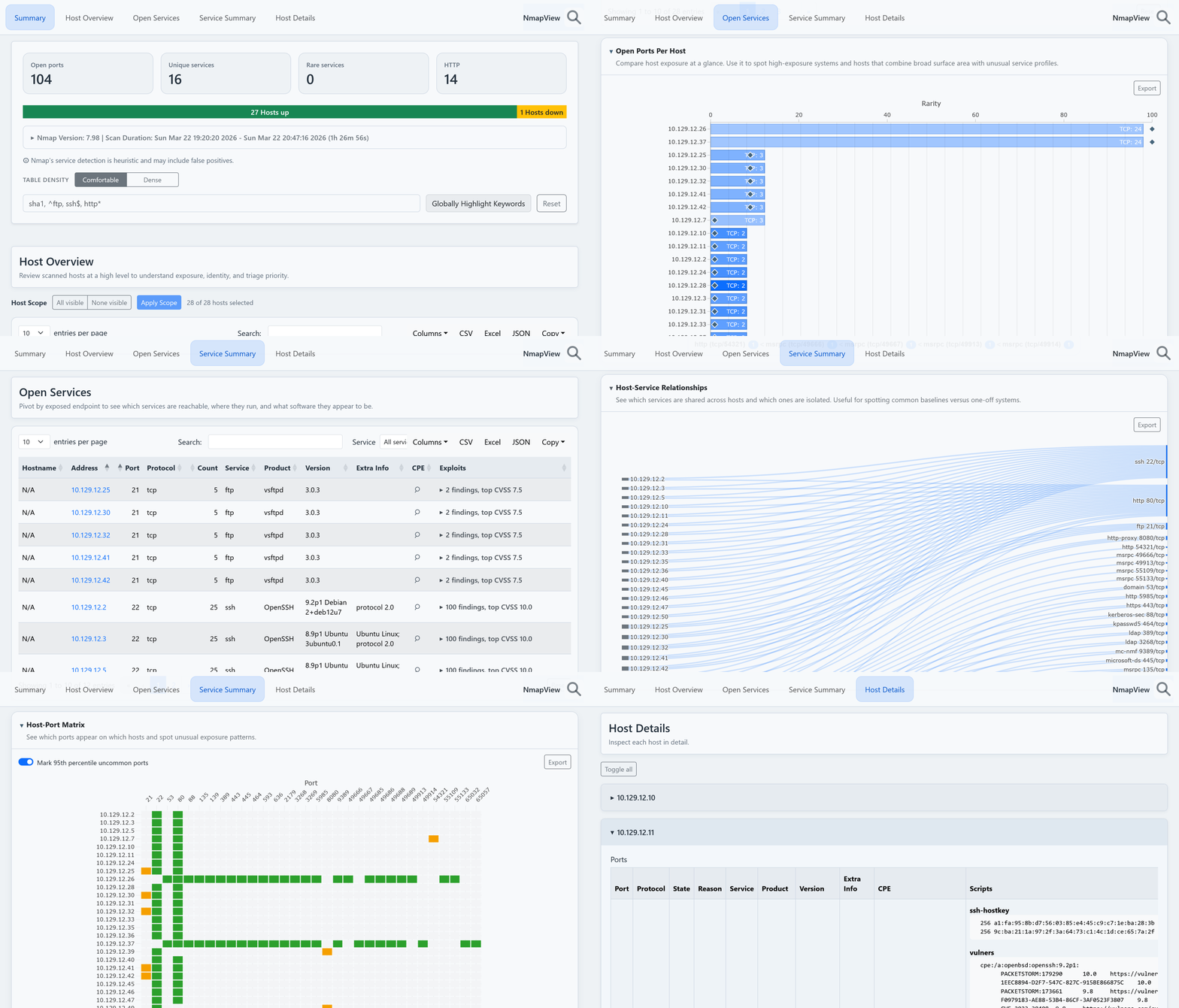
NmapView report walkthrough

Designed for security assessments, asset discovery, attack-surface reviews and pentest reporting.

Fully interactive
Sort · Filter · Search · Export (csv, json, xlsx, plain)
Host rarity scoring
Quickly surface unusual hosts and outliers
Service intelligence
Versions · Banners · NSE enrichment · CPE links
Host scoping
Focus on a subset and recompute the entire report
Single HTML file
No backend · no database · no dependencies
Built for triage
From high-level inventory to per-host investigation

From overview to deep dive

Move from broad asset visibility to detailed host investigation in a few clicks. Four structured sections, each at a different level of resolution.

Host Overview

Inventory hosts, operating systems, exposure levels and rarity scores. Each host gets a local score based on its service mix — unusual combinations float to the top without manual sorting.

Open Ports Per Host Compare exposure. Spot high-surface systems with unusual profiles.
OS Distribution See which OS families dominate and where diversity stands out.
Open Services

Review exposed services, versions, certificates, HTTP metadata, CPEs and vulnerability references. Filter by SSL, search on service names, expand NSE output inline. Port numbers are clickable for direct access in new tabs.

Service Distribution Across Hosts Separates baseline noise from uncommon services.
Host-Service Relationships Shared vs isolated services — baselines versus one-offs.
Service Summary

Group hosts by service, product and version. Script-derived details — HTTP headers, X-Powered-By, cert data — stay attached to each variant. Version drift becomes visible at a glance: SSH splits into OpenSSH families, HTTP into Apache and nginx variants.

Host-Port Matrix See which ports appear on which hosts. Spot unusual exposure patterns.
Service-Port Heatmap Confirms expected port usage, highlights unusual service-to-port combos.
Host Details

Drill into ports, banners, scripts and complete NSE output for individual hosts. Associated CVEs link out to Metasploit modules and PacketStorm references. The pivot point for incident response and targeted follow-up — scope the report first, then export to CSV or JSON for downstream tools.

Common Nmap Reporting Workflows

From jump-box triage to polished client deliverables. The same HTML report can be used for investigation, reporting, client handoff and downstream automation.

🏢 Internal Network Assessments
Enumerate hosts, spot version drift, and document findings in a portable format — without a reporting pipeline on the jump box.
🌍 Attack Surface Reviews
Map public-facing infrastructure, filter to SSL endpoints, and track remediation progress across periodic scans.
📝 Pentest Reporting
Hand clients an interactive report as a single file. No account, no server, no expiry — scope it to the hosts that matter first.
🔗 Downstream Tool Handoff
Scope and filter, then export to CSV or JSON for httpx, nuclei, testssl.sh, or ssh-audit follow-up.
🤖 LLM Analysis
The exported CSV or JSON from a scoped report is a better prompt surface than raw Nmap XML — grouped, labeled, and easy to slice.
📦 Asset Inventory
Build a living inventory from periodic scans. Export to Excel for management review, compliance tracking, or audit handoff.

Frequently Asked Questions

Common questions about generating and analysing Nmap reports with NmapView.

What is the NmapView HTML Report Template?

NmapView is an advanced Nmap XML report viewer that transforms flat Nmap scan results into a portable, interactive HTML report dashboard. Target hosts, open services, SSL certificates, NSE script output, and vulnerability references are automatically grouped into a clean nmap report format designed for rapid infrastructure investigation and security reporting.

Is my sensitive Nmap data secure when using the web transformer?

Yes, 100%. When you drop an XML file into the browser version, your Nmap data is processed entirely client-side using JavaScript within your local browser sandbox. No network transmission occurs, meaning your network architecture data never leaves your local machine, making it completely safe for sensitive penetration testing environments.

How do I convert Nmap XML data to Excel, CSV, or JSON?

The generated Nmap HTML report features built-in export actions. From the interactive data tables on the dashboard, you can instantly export filtered or global service inventories, open ports, and asset lists straight to Excel, CSV, or raw JSON data formats for reporting or further data manipulation.

What makes NmapView different from standard Nmap XML report parsers?

Unlike traditional static XSL stylesheets or complex python-to-markdown reporting pipelines that require backend server setups, NmapView runs instantly using zero-dependency local utilities like xsltproc. It yields a single, double-clickable HTML dashboard packed with modern UI features like real-time global filtering, live text highlighting, and responsive layout data visualizations.

Can I customize the design or structure of the Nmap report?

Absolutely. Because NmapView uses native XSLT 1.0, you can modify the underlying NmapView.xsl file to inject your own custom CSS styling, update brand colors, or change data columns to match your organization's internal vulnerability assessment and reporting standards.

How do I convert Nmap XML into an HTML report?

Generate a report using xsltproc:

xsltproc -o report.html NmapView.xsl scan.xml

The generated report is a standalone HTML file that can be opened, shared or archived without additional infrastructure.

Does NmapView require a server or database?

No. NmapView produces a single self-contained HTML report. No backend, API, database or container is required.

Can NmapView handle large Nmap scans?

NmapView runs entirely in the browser and is ultimately constrained by the client's CPU, memory and browser implementation.

In practice, reports containing several hundred hosts remain highly usable on modern systems. Reports with around 500 hosts are typically handled comfortably while retaining filtering, exports and visualisations.

Very large enterprise scans may benefit from scoping the report to a subset of hosts before exporting data for further processing.

Can I convert Nmap XML without installing xsltproc?

Yes. NmapView also provides a browser-based transformer that converts Nmap XML directly in your browser.

All processing happens client-side. Scan data is not uploaded to a server or transmitted over the network.

Open the browser transformer →

What is host rarity scoring?

Host rarity scoring highlights systems whose service combinations are unusual compared to the rest of the scanned environment.

The score is based on principles from information theory and uses the concept of self-information. Services that appear on only a few hosts contribute more information than services found everywhere.

As a result, hosts running uncommon combinations of software naturally rise to the top of the inventory, helping surface outliers without manual sorting.

Learn more: Self-information

Can NmapView be used during penetration tests?

Yes. NmapView is commonly useful during internal assessments, external attack-surface reviews and penetration tests where rapid triage of large scan results is required.

The report can also be delivered alongside traditional findings as an interactive inventory of the scanned environment.

Can I share generated reports?

Yes. Generated reports are self-contained HTML files.

They can be attached to tickets, archived with assessment artefacts, shared with clients or reviewed offline without requiring access to the original scan environment.

Ready to ship better reports?

Download the XSL transformer and generate your first interactive report in under a minute.